

SEO for Photographers: 14 steps to rank higher on Google
In the digital age, a stunning portfolio isn’t enough to attract clients. To get noticed, you need your photography website to rank on Google and other search engines. Search Engine Optimization (SEO) can make this happen. Here’s a simple guide to help photographers like you optimize your site and grow your business.
In this article:
What is SEO?
SEO, or Search Engine Optimization, is the practice of improving your website to rank higher on search engines like Google. It involves optimizing various elements of your site—like content, keywords, and technical performance—to make it easier for search engines to understand and display your content.
In simple terms, SEO helps search engines connect your site with people looking for the services you offer. For photographers, this means appearing in front of potential clients searching for photography services in your area or niche.
Why Photographers Need SEO?
Photographers rely on visibility to attract clients, and that starts online. A beautiful portfolio is only effective if potential clients can find it. SEO ensures your website appears in search results when people look for services like yours.
Whether you’re a wedding photographer, a portrait specialist, or a commercial pro, SEO helps you compete in a crowded market. By optimizing your website, you can reach local clients, showcase your expertise, and grow your business. SEO isn’t just about search engines—it’s about being discovered by the right people at the right time.
14 Easy SEO steps for photographers
1. Research Keywords
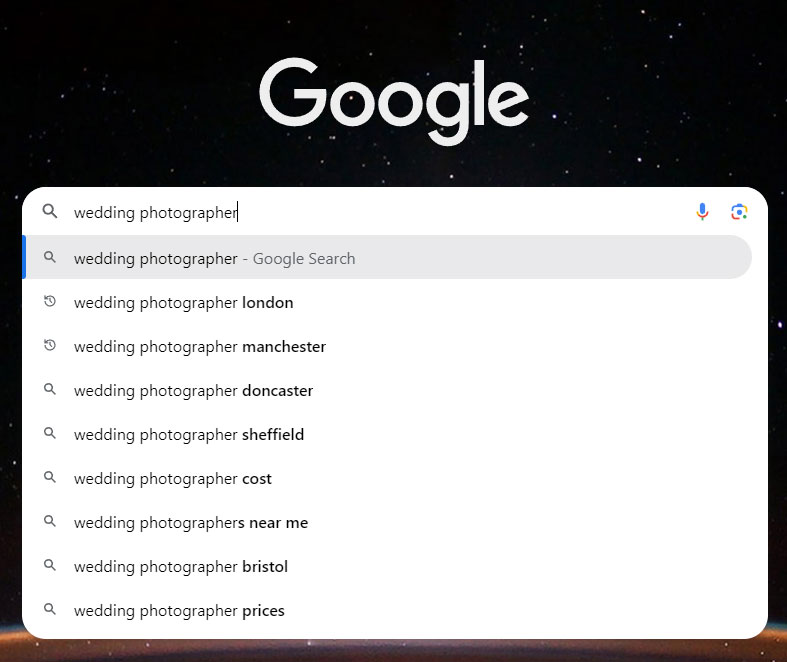
Keywords are the foundation of SEO. They’re the terms people type into Google to find services like yours. For example, “wedding photographer in NYC” or “maternity portraits in Los Angeles.” Use free tools like Google Keyword Planner or affordable options like Keywords Everywhere to find the best keywords for your photography niche.
Create a list of main keywords, related terms, and long-tail keywords. Keep them organized in a spreadsheet. Place these strategically throughout your site—in titles, meta descriptions, headings, image alt text, and body copy.
Pro tip: Use natural, conversational language. Avoid stuffing your keywords into every sentence.
2. Optimize Your Titles
Your page titles are one of the first things people see in search results. Make them descriptive, keyword-rich, and enticing. For your homepage, a good format is:
[Your Business Name]: [Main Keyword]
Example: “Award-Winning New York Photographer – Joe Blogs.”
Use a free tool like the SERP Simulator to ensure your title fits within Google’s display limits. Short and specific titles perform better than overly stuffed ones.
3. Add a Google Business Profile
If you’re targeting local clients, a Google Business Profile is essential. This free tool lets you appear in local search and Google Maps results. Fill out all the details, including your address, hours, and photos.
Keep your listing updated. Adding fresh photos every six months can improve visibility and attract more clicks. Positive reviews from clients also boost your local rankings.
4. Create Quality Content
Think about the questions your potential clients might have. What should they wear to a photoshoot? What are the best wedding venues in your area? Use these ideas to create blogs and guides that answer these queries.
Regularly posting helpful, keyword-rich content not only improves your rankings but also positions you as an expert. Short articles, how-to guides, and client success stories can all add value.
5. Compress and Optimize Your Images
Your photos are your brand, but large files can slow down your site. Compress images before uploading them. Tools like ShortPixel are great for reducing file sizes without losing quality.
Rename your images with descriptive, keyword-rich filenames, like “raleigh-engagement-photography.jpg” instead of “IMG_001.jpg.” Add alt text to each image, describing the content naturally.
Example: “Bride and groom laughing and kissing during their wedding reception at [venue name]”
6. Fix Broken Links
Broken links frustrate visitors and hurt your rankings. Use tools like Google Search Console to identify and fix these links.
Replace outdated pages or set up 301 redirects to guide users to relevant content. Regular maintenance ensures your site remains functional and user-friendly.
7. Build Backlinks
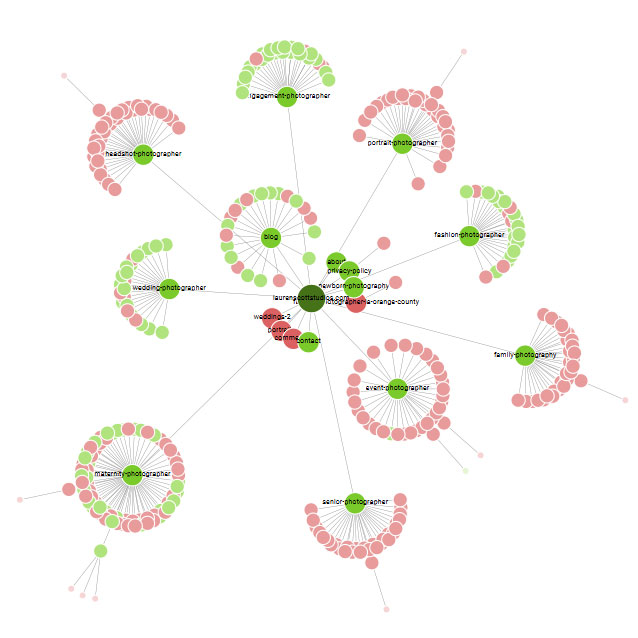
Links from other sites signal to Google that your content is valuable. Collaborate with local vendors, write guest blogs, or get featured in photography directories.
Pitch a guest article idea to a local wedding planner or a venue you’ve worked with. Include links back to your website within the content. Quality backlinks improve your SEO and broaden your reach.
8. Organize Your Headings
Headings help both search engines and users navigate your site. Your H1 should describe the page’s main topic. Subheadings (H2, H3) break content into digestible chunks.
For example, a page titled “Top Wedding Photography Tips” could have headings like “Capture the Details” or “Plan Your Shots.” Keep them clear and relevant.
9. Verify with Search Console
Google Search Console is an essential tool. It tracks your site’s performance and alerts you to problems like crawling issues. Verify your site through your domain registrar and submit your sitemap.
Use the “Performance” report to see how your pages rank and adjust your strategy as needed.
10. Focus on Local SEO
If you’re targeting clients in a specific area, make sure your site is optimized for local search. Include location-specific keywords like “colorado engagement photographer” in your titles and text.
Add your location to your footer and “About” page. Embedding a Google map of your studio can also help.
11. Speed Up Your Site
A slow website loses visitors. Tools like GTmetrix can identify what’s slowing your site down. Compress images, enable browser caching, and remove unnecessary plugins.
For WordPress users, caching plugins like WP Super Cache can dramatically improve load times.
12. Go Mobile-Friendly
Most users browse on mobile devices. If your site doesn’t look good on phones or tablets, you’re losing clients. Use a responsive design that adjusts to all screen sizes.
Google’s Mobile-Friendly Test can show areas for improvement. Fix navigation, text size, and image loading to ensure a seamless experience.
13. Use SEO Plugins
If you’re on WordPress, plugins like Yoast SEO or Rank Math make optimization simple. They guide you on keyword placement, readability, and technical SEO.
Use these tools to manage meta descriptions, sitemaps, and redirects effortlessly.
14. Track Your Results
SEO is an ongoing process. Use Google Analytics to monitor your traffic and Search Console to track keyword rankings.
Focus on what’s working. If a blog post is driving traffic, create more content on similar topics. Regularly tweak your strategy based on performance data.